
Build mobile games with Godot, Unity & AI.
A small mobile game starts with something that feels good under your thumb. Use Godot or Unity as the engine, and Claude Code or OpenAI Codex as a coding partner. This guide walks through two original starting briefs: gather supplies and survive a short night, or solve one satisfying Match-3 level. Develop on your computer, then test the actual build on a phone.
On this page
1. Choose one game and one short loop.
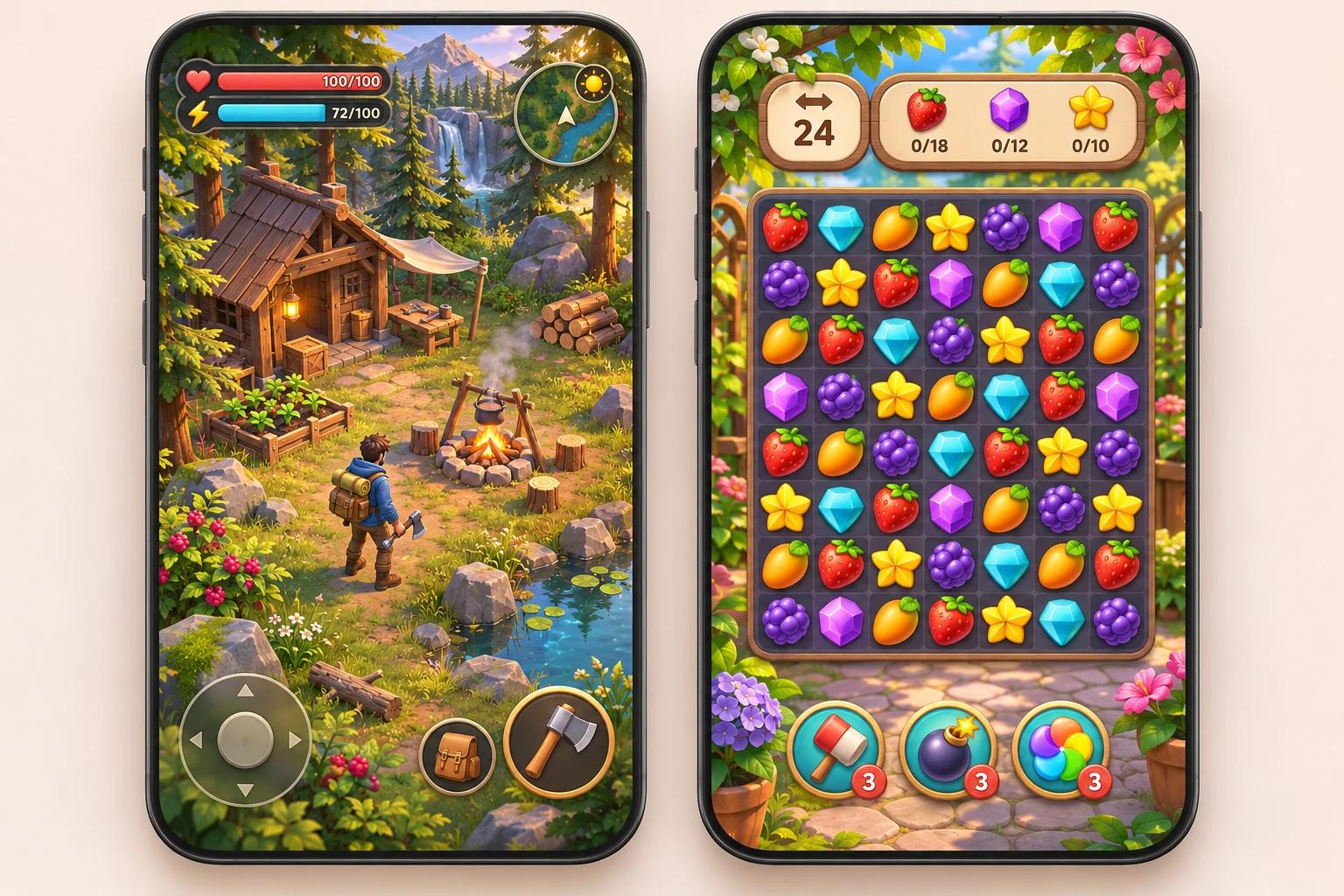
Pick one of the examples below for your first prototype. For Survival, the player explores a small clearing, gathers wood and berries, lights a fire and survives until morning. For Match-3, the player swaps adjacent pieces, clears matches and reaches a target before running out of moves.
Write down the controls, the goal, the lose condition and how to restart. Start with one area or one hand-authored level. Leave multiplayer, accounts, monetization and long-term progression for later; first make a complete round that another person can understand.
- Survival: a two-minute round, one resource loop and a visible night timer.
- Match-3: one board, one collection target and a limited number of moves.
- Choose portrait or landscape before arranging the camera, board and touch controls.
2. Create your Godot or Unity project.
Use one engine for the prototype. If you already have a project, keep its engine, language and input system. Record the exact editor version so your agent uses the APIs and project format that match it.
In Godot, create a project and a main scene. Use GDScript for the examples here, especially if you also want a Godot 4 browser demo. Start with Node2D for a 2D board or Node3D for a 3D survival scene. Install matching export templates before preparing device builds.
In Unity, create a 2D project for a flat puzzle or a 3D project for an isometric survival scene. Use C# scripts and save a main scene. Add Android Build Support through Unity Hub, including the SDK, NDK and OpenJDK dependencies; add iOS Build Support if you plan to target iPhone. Run the empty scene before introducing generated code.
Unity · Android environment setup3. Give Claude Code or Codex the project context.
Open the engine project folder in Claude Code or OpenAI Codex. Both can work with local project files; use their official setup guides below. Tell the agent the engine version, language, target phones and your smallest playable goal. Ask for a short plan, then build one working change at a time.
A coding agent can edit scripts and project files and run available tools. Direct editor control depends on the integrations you have configured. If there is no editor integration, open the engine yourself, connect the requested nodes or components, press Play and return the exact errors or a short recording. Keep a version-control checkpoint before a large change.
Official OpenAI documentation · Codex CLIInspect this game project before editing. Identify the engine and exact editor version, scripting language, main scene and current input system. Keep the existing stack.
I am making a small portrait mobile prototype for Android and iOS. Explain the smallest playable milestone and the files you will change. Use the installed engine version’s official APIs. Keep gameplay rules separate from UI and effects.
After each milestone, run the checks available here, explain how I can test it in the editor, and list any scene wiring or device testing that still needs me. Do not claim an editor run or a phone test that you did not perform.4. Build a small Survival game.
Start with movement, the camera and one resource pickup. In Godot, use a player scene with a character body, camera and input actions. In Unity, use a player GameObject with a movement component and follow camera. A virtual stick should move the character without depending on frame rate.
Once movement feels clear, add gathering, a tiny inventory, a campfire and one night timer. Keep the resource and win/lose rules independent of animation. A modest visual direction — a forest clearing, warm firelight and readable silhouettes — can make a small test feel like a world.
Build an original portrait-mobile Survival prototype in this existing Godot or Unity project. Keep the detected engine, language and version.

Scope: one small isometric forest clearing, one player, wood and berry pickups, a campfire and a two-minute day-to-night round. The player gathers wood, lights the fire and keeps it burning until morning. Show health, collected wood and time remaining. Make success, failure and Restart clear.

Controls: a left-thumb virtual stick and one large contextual action button on the right. Also support keyboard controls for editor testing. Respect screen safe areas; releasing or cancelling a touch must stop its input.

First implement movement, camera and collision with placeholders. Then add one pickup, inventory, the fire and round states. Do not add combat, networking, crafting trees or a large map. Keep UI, gameplay state and replaceable art separate.

Check pickup limits, spending wood once per action, zero fuel, reaching morning, failure and a clean restart. Use a small original low-poly environment only after the complete loop works. Tell me what you tested and what still needs a real phone.5. Build one Match-3 level.
Model the board before decorating it. In Godot, a grid model can drive reusable tile scenes. In Unity, the same grid model can drive tile prefabs. Give each tile a stable position and type, and let the model decide what matches; the visuals animate that result.
Implement adjacent swaps, horizontal and vertical matches of three or more, clearing, falling pieces and refill. Ignore new swaps while the board resolves. An invalid swap should return the pieces without spending a move. After every cascade, check both the target and whether any legal moves remain.
Build an original portrait-mobile Match-3 prototype using this project’s existing Godot or Unity stack.

One 7-column by 8-row board, five original tile types, 20 moves and a target of collecting 25 blue pieces. Support swipe between adjacent cells and tap-to-select followed by a neighboring tile. Use mouse input for editor testing too. Fit the board, move counter and target on a narrow phone without clipped cells or controls under the system safe areas.

Keep a pure board model separate from tile animation. Implement valid swaps, rollback of non-matching swaps without spending a move, clear, gravity, refill and cascades. Lock board input while resolving. Start without automatic matches and ensure at least one legal move. If no moves remain, reshuffle while preserving the remaining moves and collection progress. Finish resolving the board before showing win or loss.

Use a fixed random seed or fixtures to check a horizontal match, vertical match, overlapping matches, an invalid swap, a cascade, a dead board and the last move reaching the target. A cell in overlapping matches is collected only once. Restart must reset the board, moves, target and pending animations.

Build the logic with simple placeholders first. Then give it a colorful garden theme, satisfying short feedback and large readable pieces. No boosters, map, purchases or backend yet.6. Test the game under your thumb.
A mouse test catches logic problems; a phone test reveals whether the game feels comfortable. Try the build on the smallest and oldest phone you intend to support. Watch frame time and memory with the engine’s profiling tools before deciding which assets or effects to simplify.
Give a tester one task and observe a full round without explaining every step. For Survival, look for missed interactions, camera obstruction and accidental movement. For Match-3, watch for missed swipes, busy effects and uncertainty about the target. Change one problem and play the same round again.
Godot · Input examples and touch events- Keep thumb controls away from notches, home indicators and important play areas.
- Check simultaneous touches, sliding off a button and interrupted touch gestures.
- Pause safely when the app loses focus; resume without a stuck stick, duplicated reward or lost board.
- Test restart during and after effects so old timers and animations cannot change the new round.
- Keep textures and particles modest, and reuse frequently spawned objects where profiling shows a benefit.
7. Make an Android device build.
For Godot, install the export templates and configure the Android SDK and Java SDK paths in Editor Settings. Follow the Android export guide for the exact SDK packages and JDK required by your editor version. Create an Android export preset, set the application identifier and export a debug build for device testing.
For Unity 6, open File → Build Profiles, add Android and switch to that profile. Use Build and Run with your connected test device. Follow the Android build guide when preparing an APK or an Android App Bundle; a working development build comes before a signed store release. In either engine, test startup, a full round, background/resume, sound and restart in the installed app.
Godot · Exporting for Android8. Make an iPhone device build.
For a local iOS build, use a Mac with Xcode. Godot exports an Xcode project using its iOS export preset and matching export templates. Unity requires iOS Build Support and also generates an Xcode project for the native build.
Open the exported project in Xcode, configure its signing team and bundle identifier, then build for your test iPhone. Follow your engine’s iOS guide for the current signing and export steps. Check the actual device layout and touch behavior; App Store distribution is a separate release step.
Unity · iOS environment setupOfficial resources
Use these resources for tool setup, APIs and model availability. The prompts above are original Playtagon starting briefs for a small, step-by-step project.
- Claude Code quickstart
- Official OpenAI documentation · Codex CLI
- Godot · Input examples
- Godot · Android export
- Godot · iOS export
- Godot · Web export and C# limitations
- Unity · Android setup
- Unity · Build an Android application
- Unity · iOS setup
- Unity · Web browser compatibility
Sources checked 21 November 2026.
Ready for a first playtest?
Learn how to package your ZIP and host it on Playtagon.
Publish your demo